read email
Click directly on the subject of the message to read the message。
If you receive a message that contains an attachment, on the mailing list page, the message line will have a paper clip icon.When reading the email, you can choose to open or download the attachment.
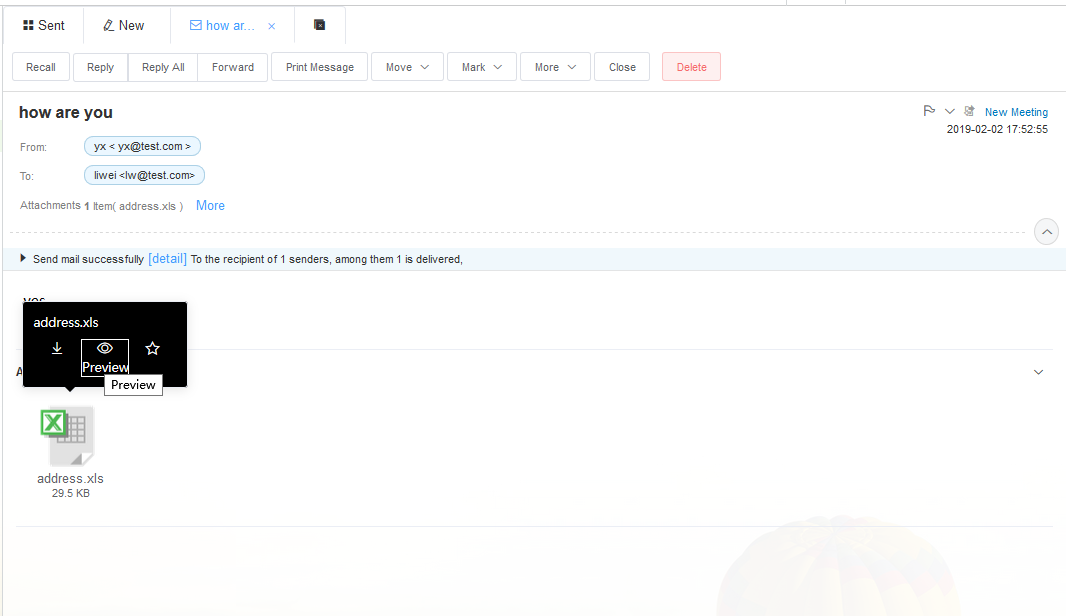
Open the letter reading interface of the email, and the attachment attached to the email will be displayed at the bottom of the interface. Move the mouse pointer to the attachment and the mark of online preview will appear.Click to preview the attachment online.
This problem is caused by a setting in IE, you can open the attachment as long as you cancel this option。
The specific operation is as follows:
- 1) Open Internet explorer and select Internet options from the tools menu”。
- 2) In the advanced TAB of Internet options, find the browse option, cancel the always send URL in utf-8, and click ok to save your changes。
Once you have changed the Settings, you can open the attachment in the message。
 |
Word Document, Microsoft word open |  |
Text, notepad open |
 |
Mail, Outlook open |  |
Web page, browser IE open |
 |
Excel Document, Microsoft Excel open |  |
RAR Compression, WinRAR open |
 |
Slide, Microsoft PowerPoint open |  |
PDF Document, open with AdobeReader |
 |
ZIP Compression, WinRAR open |
- 1) Attachment forwarding: the current message will be forwarded as an attachment in the. Eml format
- 2) Add to personal address book: add the sender and recipient information of this message to personal address book
- 3) Mail download: download mail to your local computer in eml format
- 4) Rejected mail: add the sender to the blacklist
- 5) Send again: go to the letter page and edit the message again
- 6) Delete: completely delete this message from your mailbox
- 7) Check the header: check the header information, often used for mail screening
- 8) View text: in the form of mail source to view the mail, often used for the screening of mail
- 1) Please see the folder that contains the messages to be moved.This could be the inbox or another folder)
- 2) Select the message to transfer
- 3) Click the move to drop-down list on the page。
- 4) Select the destination folder from the drop-down list. The mail was immediately transferred。
Yes, click the "forward" button at the top of the letter reading page, fill in the recipient on the forward email page, and click "send" after editing the complete email。
There are three reasons for receiving garbled emails:
- a) Since the code of the country or region where the sender is located is different from that in mainland China, such as Hong Kong and Taiwan, Big5 is commonly used. If you directly check it in the email box, it may appear as garbled code。
- b) Because the sender is using a different tool than you are using。
- c) This is because the sender mail server has a different mail transport mechanism than your mail server。
For the vast majority of garbled mail you can try to use the following solution:
Such as in the webmail interface to view the mail garbled, you directly contact the mailbox administrator if the client shows garbled, such as (Foxmail), you can read the letter window, Click on more operations, code, modify to other code, see if it is normal.The commonly usedGB2312,UTF-8,Big5.
Please click "Settings" - "general Settings" - "basic Settings" in Webmail to set the corresponding mailbox time zone。